
The short answer
Accessible web design, also called accessible website design, means building web pages that people of all abilities can perceive, operate and understand, including people who rely on screen readers, keyboards, captions or magnification. In practice that means designing to WCAG 2.2 AA from the first wireframe, testing with real assistive technology, and keeping it accessible as content changes. Built in from the start, it costs less than fixing it later and makes the site better for everyone.
Where should you start with accessible web design?
Start from where your website is today. Find the row that describes your situation.
| Your situation | Start with | Why |
|---|---|---|
| Planning a new site or redesign | WCAG 2.2 AA written into the brief | It’s cheapest to get right before anything is designed |
| A live site that’s never been checked | An accessibility audit | Automated scans, keyboard checks and a screen reader pass show what’s broken |
| You received a demand letter | Your lawyer, then an audit | You need a documented plan to fix the issues |
| A public agency or school | ADA Title II deadlines | The rule names WCAG 2.1 AA and sets fixed dates |
| An overlay widget is installed | Fixing the underlying code | A widget doesn’t repair the site underneath |
What is accessible web design?
Web accessibility means every person has equal access to the same information and can complete the same tasks on your site, whatever their ability or the technology they use. The standard is the Web Content Accessibility Guidelines (WCAG) from the World Wide Web Consortium (W3C), which organize every requirement under four principles: content must be perceivable, operable, understandable and robust.
Accessible design doesn’t have its own look. It lives in the user interface, color, type, interaction patterns, content and code, and most visitors never notice it except that the site feels easier to use. Accessibility-first web design simply means treating accessibility requirements as part of design and development from the start, alongside performance and security, instead of fixing accessibility issues after launch.
Who does accessible design help?
Accessible design helps far more users with disabilities than most teams expect. The World Health Organization estimates that 1.3 billion people, about 16% of the world’s population, live with a significant disability, and the CDC reports that more than 1 in 4 U.S. adults have some type of disability.
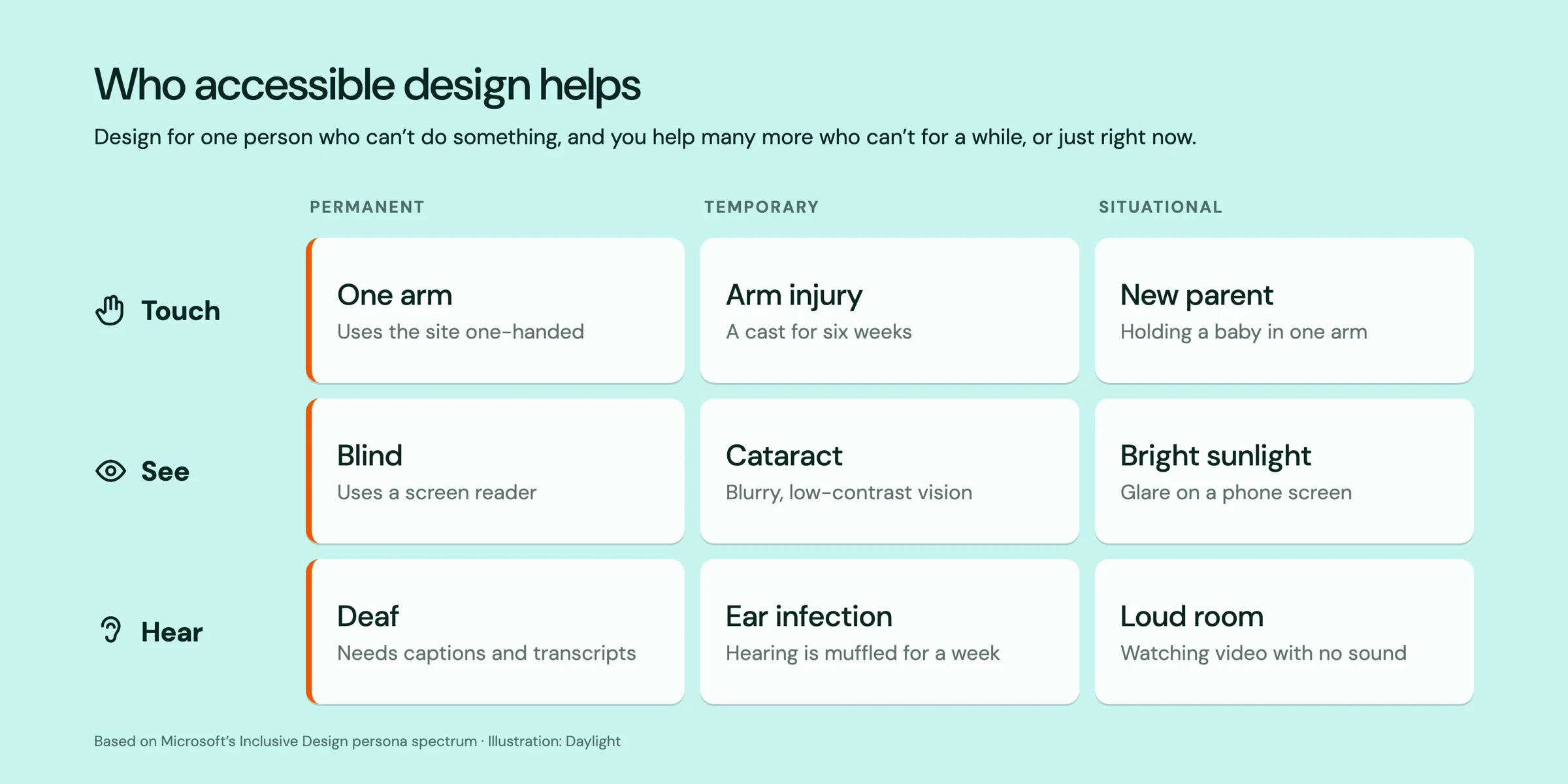
Inclusive web design is the process behind it. It asks who a design decision might exclude, and it counts temporary and situational limits too, which is why Microsoft’s inclusive design principles sum it up as “solve for one, extend to many.”
Why is accessible web design good business?
Because it widens your audience, lowers legal risk and supports search. The Return on Disability Group’s 2024 report sizes the global disability market, people with disabilities plus their friends and family, at $18.3 trillion, so an inaccessible checkout turns away real customers. Digital accessibility also improves the user experience for everyone and shares the structure search engines rely on, which we cover below.
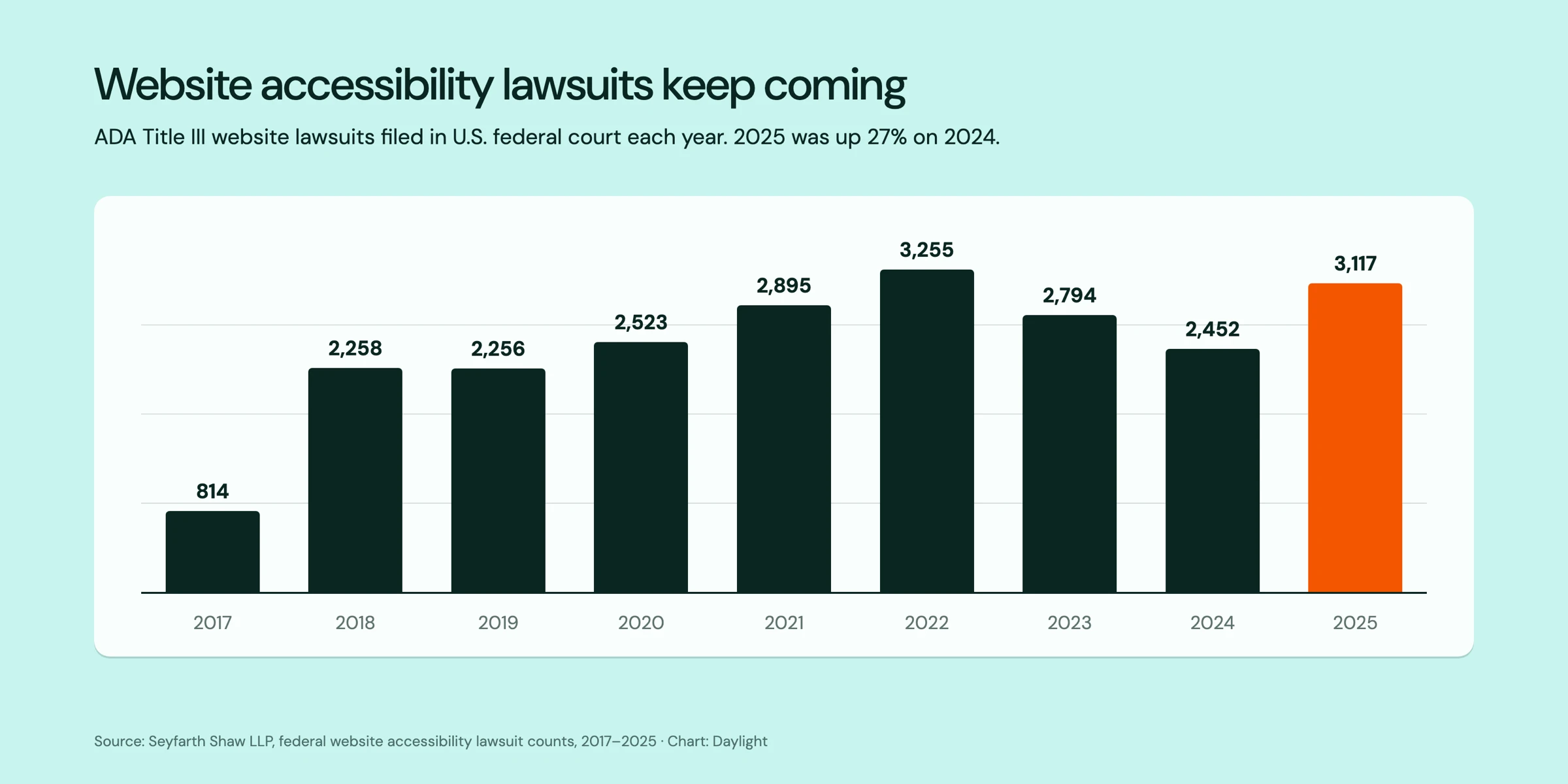
The legal risk is real and rising again. According to Seyfarth Shaw’s count, plaintiffs filed 3,117 website accessibility lawsuits in U.S. federal court in 2025, up 27% from 2024. Meeting the standard is one of the cheapest ways to reduce that exposure.
What does an accessibility-first website include?
Accessibility first design produces the same features on every accessible site, and each one makes the site accessible to people far beyond the group it was designed for:
- Semantic HTML with one H1 and headings in order, so screen readers and search engines can follow the outline.
- Contrast ratios that meet the minimums: 4.5:1 for body text and 3:1 for large text.
- Full keyboard accessibility, with visible focus states that never hide behind a sticky header.
- Touch and click targets of at least 24 by 24 CSS pixels, the WCAG 2.2 minimum.
- Form fields with visible labels, clear error messages and no need to retype information.
- Alt text for meaningful images, plus captions and transcripts for video and audio.
- Motion that people can pause, and respect for the reduced-motion setting.
- Plain language, descriptive link text and calls to action that say where they lead.
How do you design an accessible website?
An accessible website comes from a process, not a plugin. The W3C’s guidance and common industry practice point to the same steps, from discovery to launch and beyond:
- Make WCAG 2.2 AA a written requirement in the brief and in the acceptance criteria.
- Include people with a range of abilities, and people who use assistive technology, in research and usability testing.
- Check contrast, type scale, focus states and target sizes in the design system, before pages are built.
- Plan heading order, landmarks, reading order and keyboard flow in the wireframes.
- Build with native HTML first, use ARIA only where it’s needed, and label every control.
- Test three ways: automated scanners, manual keyboard and screen reader checks, and sessions with real users.
- Keep checking after launch, because new content and plugins can add new barriers.
Does accessible web design help SEO?
It helps indirectly, because search engines, AI tools and screen readers read web pages in similar ways, so the practices that help one help the others: a logical heading outline, descriptive alt text, captions and transcripts that turn media into indexable text, descriptive link text and fast, stable, mobile-friendly pages. Accessibility isn’t a ranking shortcut on its own, but it builds the foundation good SEO depends on, which we cover in building your site for bots.
What does the law require for website accessibility?
It depends on who you are and where you operate. In the U.S., the Justice Department’s 2024 rule under Title II of the Americans with Disabilities Act (ADA) names WCAG 2.1 AA as the standard for state and local government websites and apps, and in April 2026 it extended the compliance dates to April 26, 2027 for governments serving 50,000 or more people, and to April 26, 2028 for smaller ones and special districts. Private businesses fall under Title III, where the DOJ’s web guidance says online goods and services must be accessible and points to WCAG.
In the EU, the European Accessibility Act has applied since June 2025 to services such as ecommerce and banking. This isn’t legal advice, so confirm your obligations with counsel.
Should you use an accessibility overlay?
Relying on one alone is risky. An overlay is a widget that sits on top of a site; it doesn’t fix the code, structure or content underneath, which is where most barriers live. In 2025 the FTC required overlay maker accessiBe to pay $1 million over claims that its plug-in could make any website WCAG-compliant. Spend that budget fixing the design system and templates, so every new page starts accessible.
Frequently asked questions
What is the difference between accessible and inclusive design?
Accessibility is the outcome, measured against a standard such as WCAG 2.2 AA. Inclusive design is the process that gets you there: it asks who a decision might exclude and involves a diverse range of people in research and testing.
What WCAG level should a website meet?
Most organizations aim for WCAG 2.2 AA, the current version of the guidelines. It builds on WCAG 2.1 AA, the level that U.S. Title II rules name, and adds requirements such as minimum target sizes.
How do I know if my website is accessible?
Run an automated scanner, then try the site with only a keyboard and with a screen reader such as VoiceOver or NVDA. Automated tools catch only part of the problem, so a full accessibility audit combines all three with testing by people who use assistive technology.
Planning a website project? Tell us about it, or see our design work first.

Portland digital agency since 2002

The True Cost of a Bad Website: Warning Signs and How to Fix It
A bad website quietly costs leads, revenue and trust. Learn the warning signs, how to estimate the damage and how to fix it without losing SEO.